Introduction
Modern Mercedes‑Benz vehicles are packed with electronic modules that control nearly every system in the car. From the engine and transmission to the steering lock and instrument cluster, each module communicates via a complex network. With professional diagnostic and programming tools, you can read, test, diagnose, and even program many of these modules, not just keys.
This guide covers two professional tools:
-
Mercedes‑Benz Full Test Platform Pro (MK3 tool)
A professional Mercedes module bench tester supporting FAST Calculation (FBS4), EZS/EIS, ECUs, TCU/VGS, ISM, dashboards, and steering locks (ELV/ESL).
It is compatible with Xhorse VVDI MB Tool, Xhorse VVDI Key Tool Plus Pad, ABRITES, AUTEL, and CGDI MB. (Official MK3 page) -
CGDI Prog MB Benz Key Programmer
A versatile key programming tool that can read EIS/EZS, program keys, calculate passwords, and even interact with other modules. (Official CGDI page)
What You’ll Learn
By following this guide, you will:
- Understand the role of each Mercedes module and what it controls
- Safely connect these tools to the car or individual modules
- Perform module testing, password reading, key programming, and firmware renewals
- Troubleshoot issues and interpret results
- Use reference manuals for advanced operations
Key Mercedes Modules You Can Work With
| Module | What It Does | What You Can Do With Tools | Image |
|---|---|---|---|
| ECU | Engine Control Unit – manages fuel, ignition, emissions | Read data, test sensors, reprogram ECU functions | 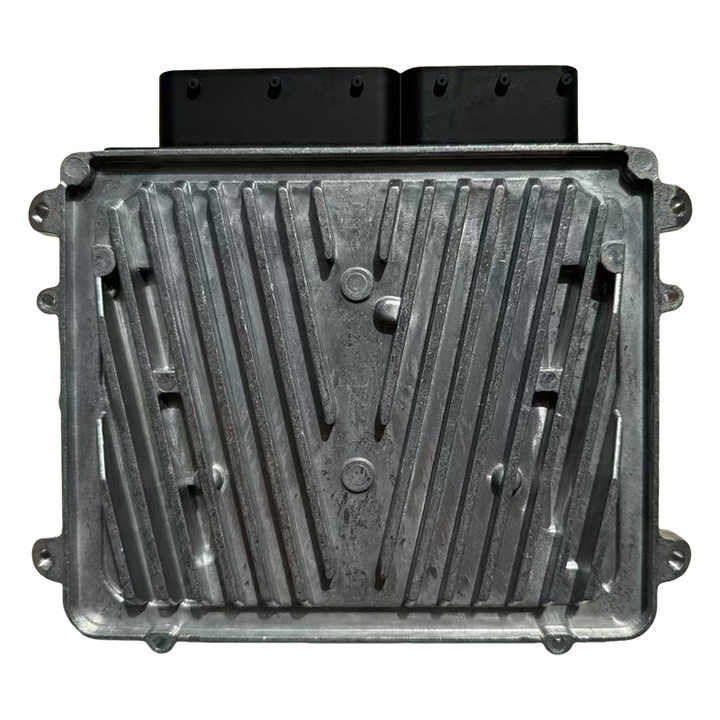 |
| TCU / VGS | Transmission Control Unit – controls automatic gear shifts | Test adaptive values, reset learned behavior, reprogram shifting logic | 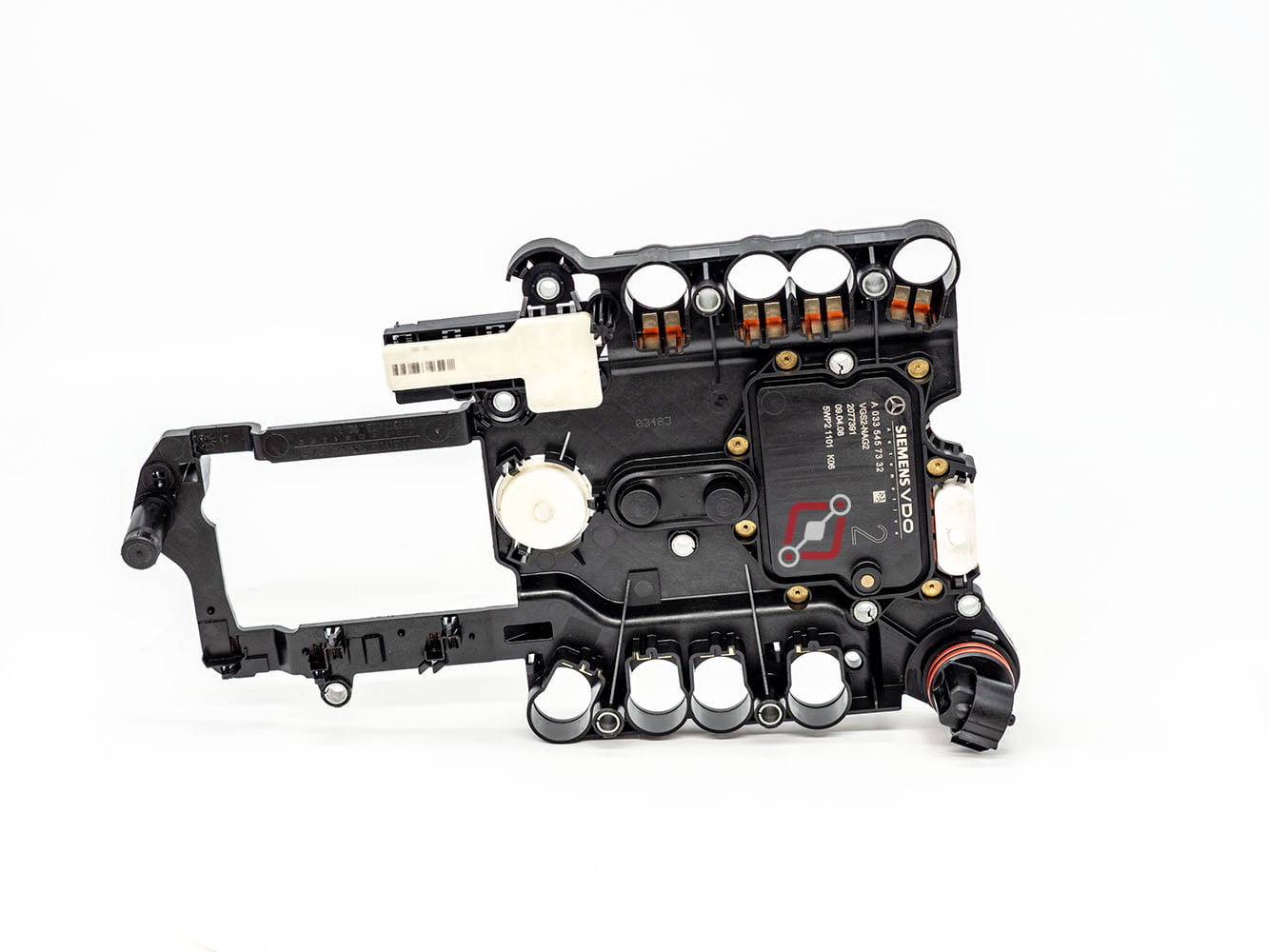 |
| EIS / EZS | Electronic Ignition Switch – authorizes keys, manages immobilizer | Read module info, calculate passwords, program new keys, reset functions |  |
| ELV / ESL | Steering Lock – prevents unauthorized starts | Test locking/unlocking, program replacement locks, emulate ELV/ESL | 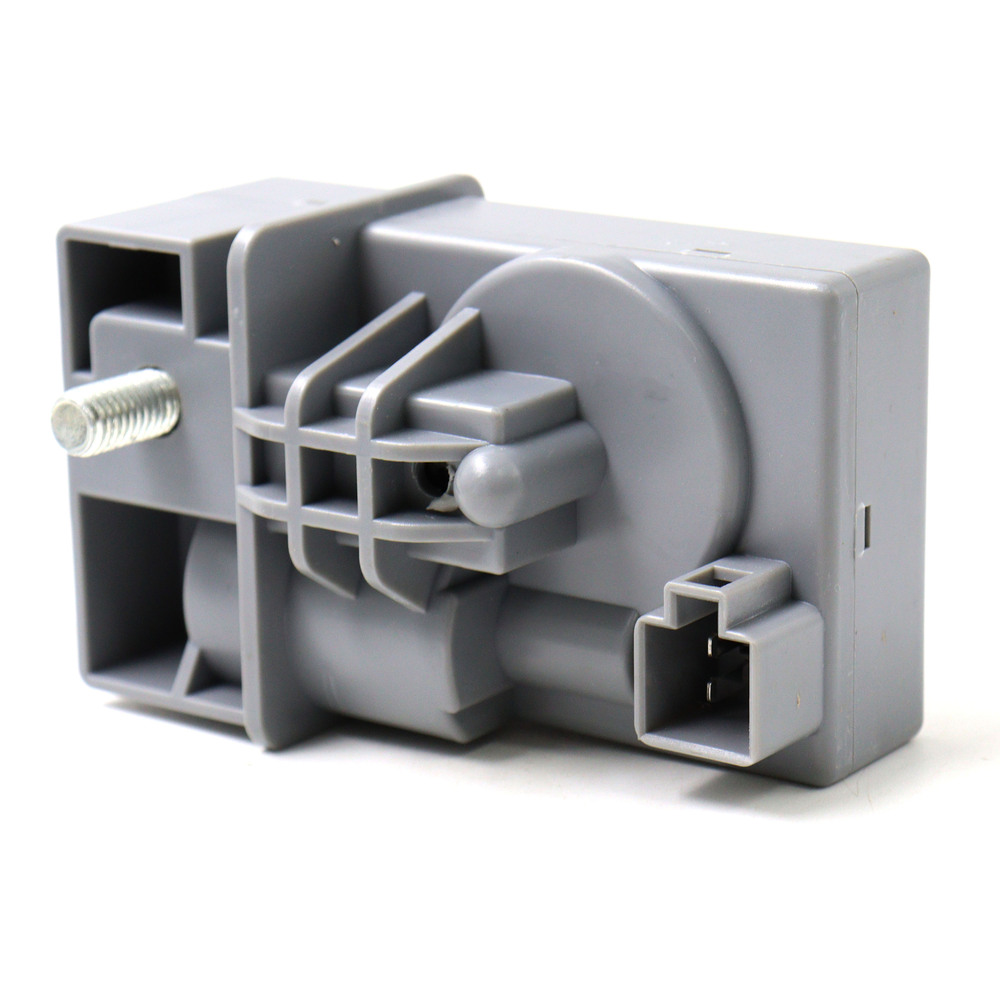 |
| ISM | Intelligent Servo Module – gear selector control | Renew ISM, bench test, communication test | 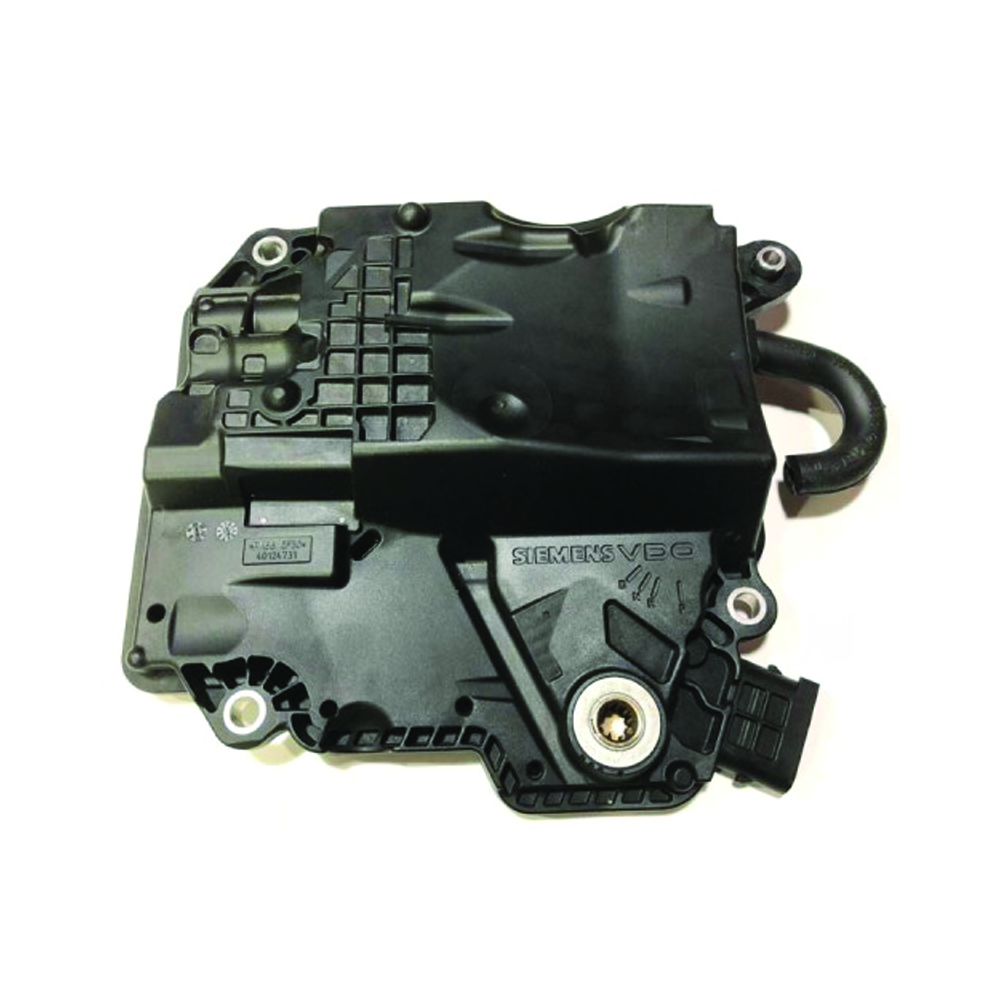 |
| Gateway | Central communication hub | Diagnose network, update firmware, configure module communication | 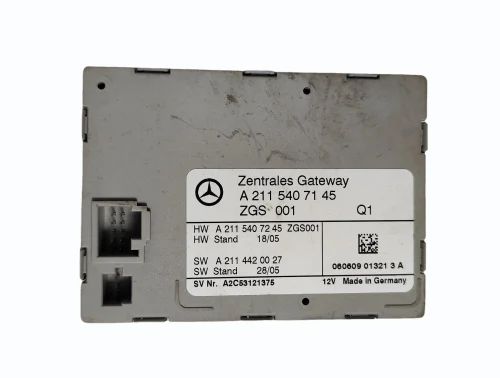 |
Note: The MK3 Full Test Platform Pro includes built-in ELV/ESL emulators, allowing you to test EIS/EZS even without the original steering lock. This is critical when performing bench testing or module repair.
Overview of Tools
Mercedes‑Benz Full Test Platform Pro
- Bench test EIS/EZS, ELV/ESL, dashboards, TCU/VGS, ECUs
- Built-in steering lock emulator for W204/W207
- Supports old and new EZS/EIS units (Motorola and NEC)
- Compatible with multiple programming tools: Xhorse VVDI, ABRITES, CGDI MB, AUTEL
- Supports FAST calculation for all FBS3/FBS4 modules
- No additional kit required; full cable set included
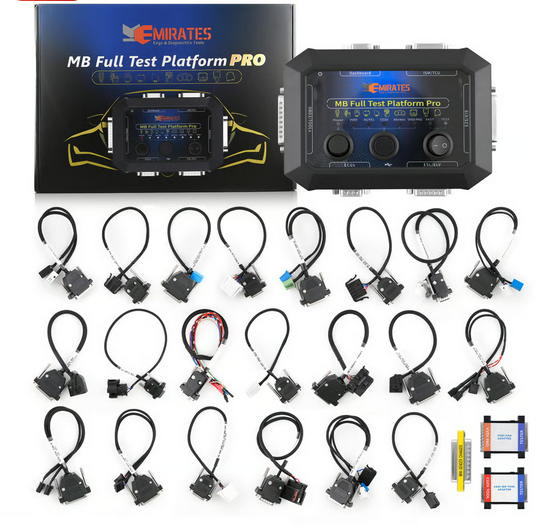 _MK3 Full Test Platform Pro – supports EZS/EIS, ELV/ESL, dashboards, ECUs, TCU, ISM_
CGDI Prog MB Benz Key Programmer
- Fastest Mercedes key add: 1’50’’ collection time, 40s password calculation
- Supports both BE keys and original keys
- Works with “all keys lost” scenarios for a wide range of models
- Supports ECU renew (ME9.7, MED17, CR3.xx, CR4.xx, CR5, CR60.xx, CRD.xx, SIM series)
- Gearbox renew supported for EGS 7G
- Infrared diode upgrade improves keyless GO programming
- Lifetime online software updates, multi-language support
- Supports mileage repair and gateway read/write authorization
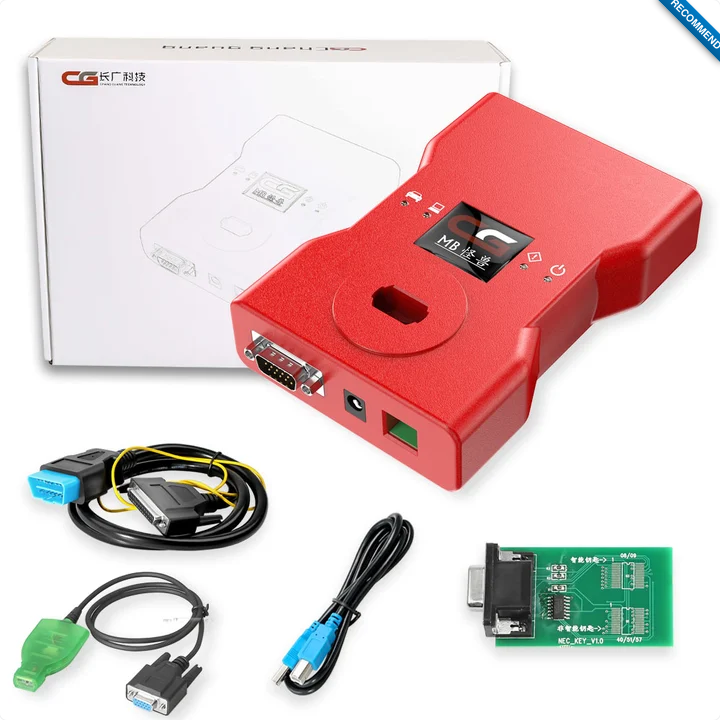 _CGDI Prog MB – key programmer, EIS/EZS reading & writing, password calculation_
With this foundation, the rest of the book will guide you through step-by-step testing, programming, and module operations using these tools, along with screenshots, diagrams, and reference manuals for advanced work.
Requirements
Before using the tools and procedures described in this guide, make sure you meet the following requirements. These tools interact directly with Mercedes-Benz security and control modules, so preparation is critical.
Intended Audience
This guide is intended for:
- Automotive technicians
- Auto locksmiths
- Diagnostic specialists
- Automotive electronics repair professionals
It is not intended for beginners with no automotive or electronics experience.
Knowledge Prerequisites
You should already understand:
- Basic vehicle electrical systems
- CAN and LIN bus fundamentals
- Difference between ECU, TCU, EIS/EZS, ELV/ESL, ISM, and Gateway
- Safe handling of electronic control units
- Windows PC operation and driver installation
If terms like EIS, FBS3/FBS4, or ELV emulator are unfamiliar, review the Introduction and Glossary first.
Hardware Requirements
Required Tools
- Mercedes-Benz Full Test Platform Pro (MK24712)
- CGDI Prog MB Benz Key Programmer
- Windows laptop or PC
- Stable USB cables
- Original test platform wiring harnesses and adapters
Recommended Equipment
- Regulated 12–14V bench power supply (minimum 5A)
- Vehicle battery charger / stabilizer (for in-car work)
- ESD protection (anti-static wrist strap)
- Clean workbench with proper lighting
Software Requirements
- Windows 10 / 11 (64-bit recommended)
- Latest official software for:
- CGDI Prog MB
- VVDI MB Tool / AUTEL / ABRITES (if used with MK3)
- USB drivers installed correctly
- Administrator access on the PC
Always download software from official vendor websites only.
Vehicle & Module Conditions
- Vehicle battery voltage must be stable (≥12.4V)
- For programming operations, use a battery stabilizer
- Bench testing requires correct wiring and polarity
- Modules must match supported model lists
- Backup original data before writing or renewing modules
Safety & Legal Notice
- These tools can permanently alter vehicle modules
- Incorrect wiring or voltage may damage ECUs
- Some operations may be restricted by local law
- Always confirm vehicle ownership and authorization
- This guide does not encourage illegal activity
You are responsible for complying with all applicable laws and regulations.
Important Notes
- Never hot-plug modules during active programming
- Do not interrupt power during write operations
- Label and organize cables to avoid cross-connection
- When in doubt, stop and verify before proceeding
Mercedes-Benz Full Test Platform Pro (MK24712)
The Mercedes-Benz Full Test Platform Pro is a professional on-bench testing, diagnostic, and programming platform designed specifically for Mercedes-Benz electronic control units.
Unlike basic key programmers, this tool allows you to power, simulate, test, and interact with multiple Mercedes modules outside the vehicle, making it essential for repair, diagnostics, renewals, and advanced programming work.

Figure 3.1: Mercedes-Benz Full Test Platform Pro – supports EZS/EIS, ELV/ESL, dashboards, ECUs, TCU, ISM
What This Tool Is Designed For
The Full Test Platform Pro is built to:
- Bench-test Mercedes control units without the car
- Simulate missing modules (ELV/ESL, Gateway)
- Work with multiple aftermarket programming tools
- Support FBS3 and FBS4 systems with FAST calculation
- Provide a safe environment for diagnostics and module repair
Front Panel – Physical Buttons
The Mercedes-Benz Full Test Platform Pro has three physical buttons on the front panel. These buttons control power, module routing, and operating mode.
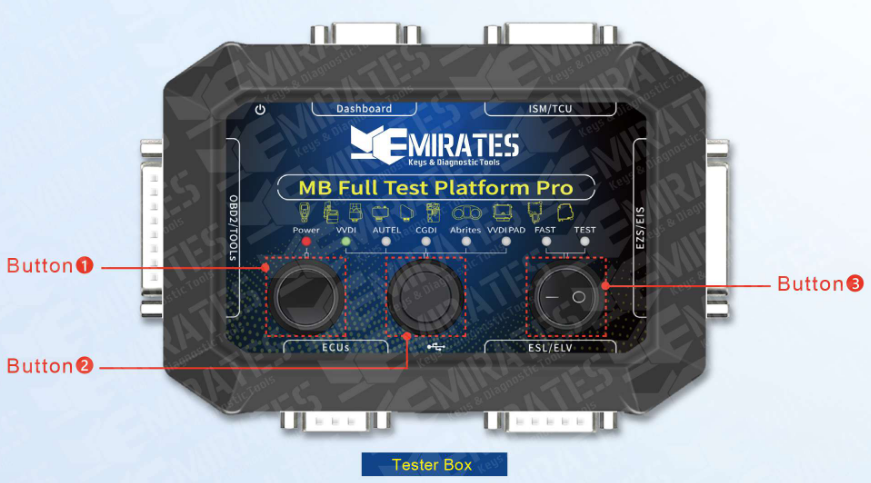
Figure 3.2: MK3 Front Panel with Buttons
॰ Button 1 (Power)
Function:
- Turns the test platform ON / OFF
Usage Notes:
- Must be OFF before connecting or disconnecting any module or cable
- Power ON only after all cables are connected correctly
- Power OFF before changing device mode or pin-out cables
⚠️ Never hot-plug modules while the platform is powered ON.
॰ Button 2 (Device Switch)
Function:
- Selects the active programming tool interface
- Routes communication and signal lines to match the selected programmer
Device Interfaces:
- VVDI
- AUTEL
- CGDI
- ABRITES
- VVDI PAD
Atention! Different device have different protocols, selecting the correct device is mandatory for successful communication.
Usage Notes:
- Always select the device interface that matches the connected programming tool
- Using the wrong device interface may result in:
- No communication
- Incorrect voltage routing
- Programming failure
॰ Button 3 (FAST / TEST)
Function:
- Switches between FAST mode and TEST mode
FAST Mode:
- Enables FAST calculation for FBS3 and FBS4 systems
- Used for:
- EIS / EZS password calculation
- Data collection
- Key programming support
- Security-related operations
TEST Mode:
- Used for bench testing and diagnostics
- Powers modules for:
- Communication testing (e.g, Simulating ELV/ESL behavior)
- Module verification
- Renew and repair operations
Side Panel – D-Subminiature (DB) Connector Details
The Test platform has 6 positions to insert DB cable and 2 positions for power and USB. Which is convenient for users to connect any control unit together and complete programming.
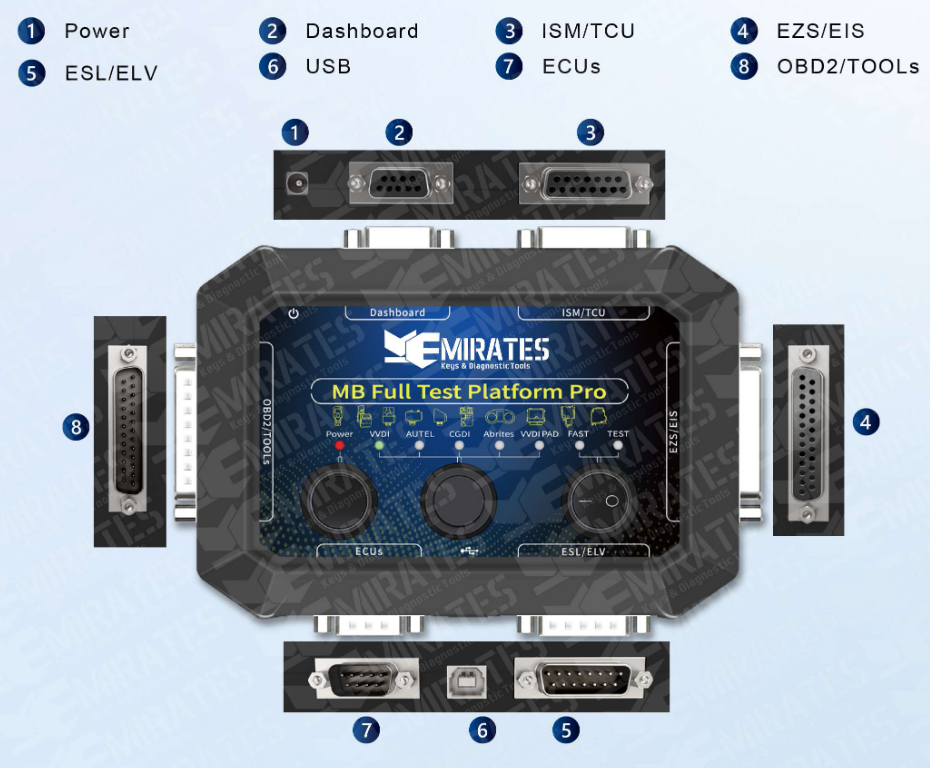
Figure 3.3: MK3 Side Panel with DB Connectors
Connector Functions
Based on the numbered legend in Figure 3.3, here is a breakdown of what each port does:
| No. | Label | Function & Purpose |
|---|---|---|
| 1 | Power | The DC input port. This provides the necessary 12V power to the platform and all connected Mercedes modules. |
| 2 | Dashboard | A DB9/DB15 style port used to connect the vehicle's Instrument Cluster. This allows you to check for mileage, warning lights, or communication errors on the bench. |
| 3 | ISM / TCU | Used for the Intelligent Servo Module (gear shifter) or Transmission Control Unit. Essential for virginizing or personalizing transmission components. |
| 4 | EZS / EIS | This connects to the Electronic Ignition Switch. This is the brain of the Mercedes security system where the key is inserted. |
| 5 | ESL / ELV | Connects to the Electronic Steering Lock. This is used to test if the steering lock is synchronizing properly with the key and ignition. |
| 6 | USB | A Type-B USB port used to connect the platform to a computer for firmware updates or to interface with diagnostic software. |
| 7 | ECUs | Used to connect the Engine Control Unit. This is vital for testing the drive authorization system (FBS3/FBS4) to ensure the engine will actually start. |
| 8 | OBD2 / TOOLS | This is the main interface for your diagnostic tools (like VVDI, Autel, Abrites, or CGDI). It acts as the bridge between your programmer and the modules connected to the other ports. |
Connector Cables and Adapters
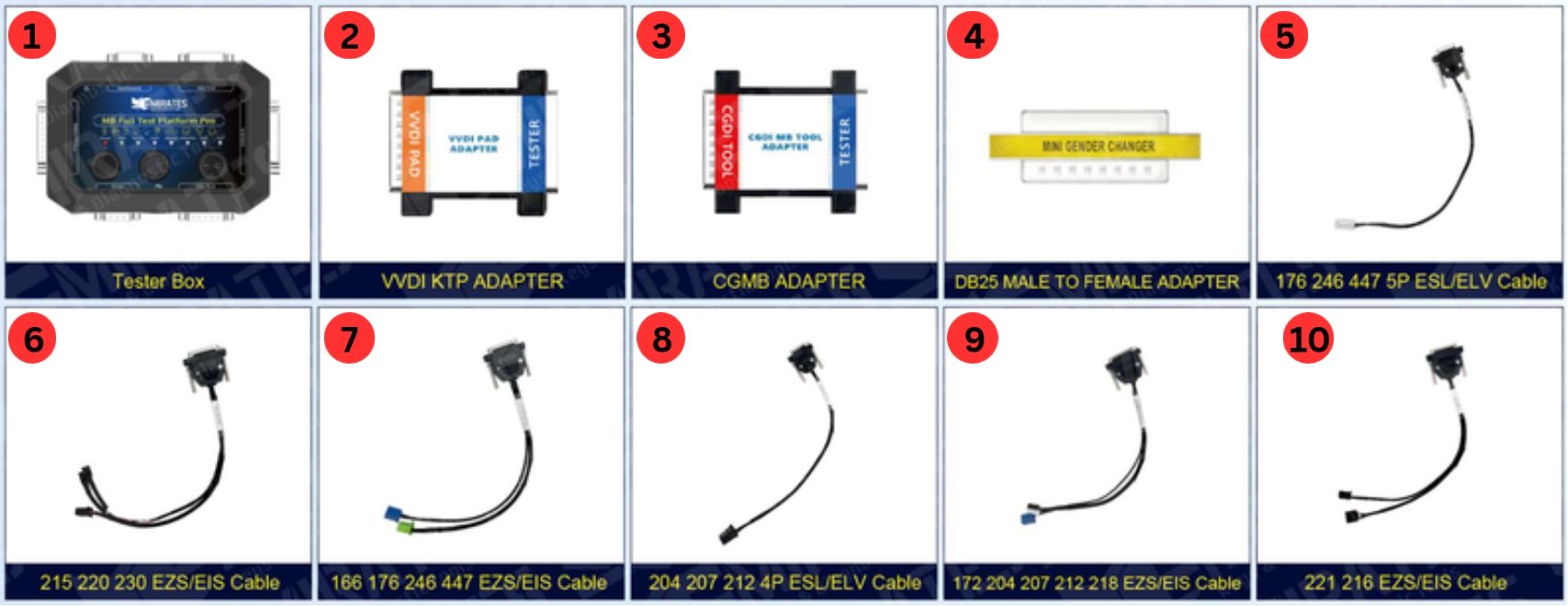
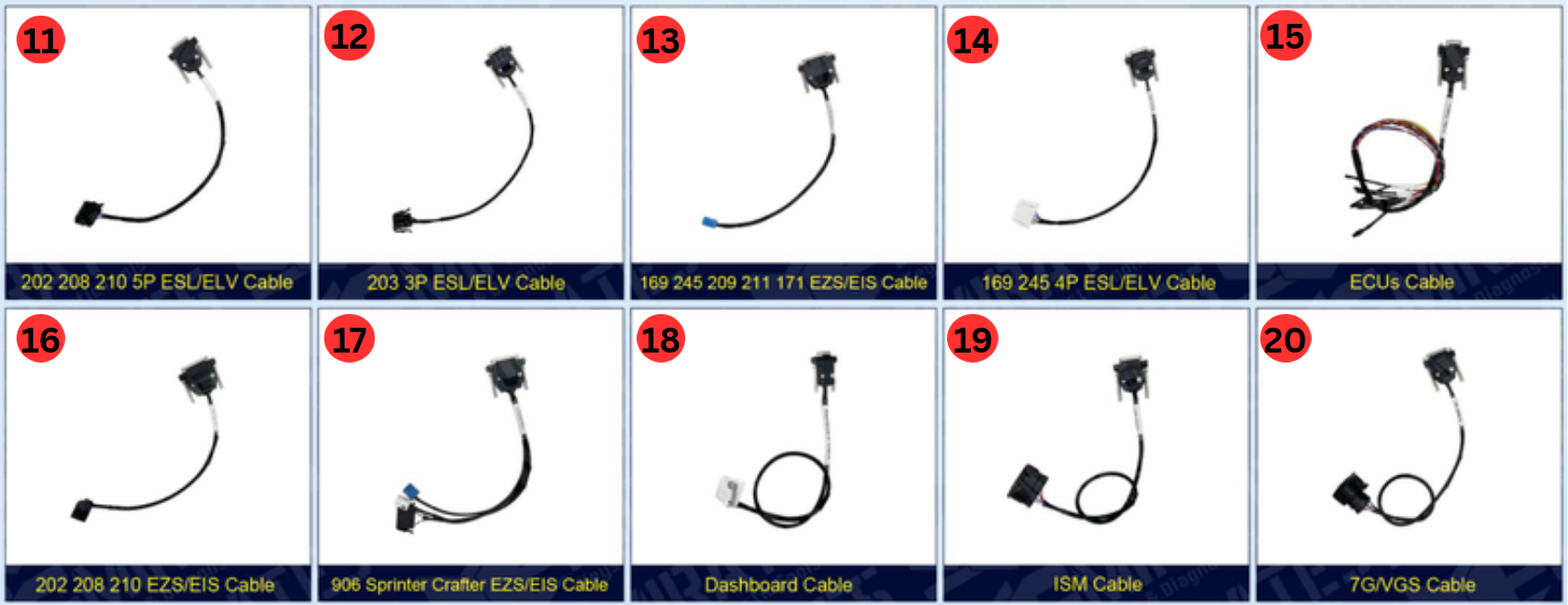

| 2. | VVDI KTP Adapter | 14. | 169 245 4P ESL/ELV Cable |
| 3. | CGMB Adapter | 15. | ECUs Cable |
| 4. | DB25 Male to Female Adapter | 16. | 202 208 210 EZS/EIS Cable |
| 5. | 176 246 447 5P ESL/ELV Cable | 17. | 906 Sprinter Crafter EZS/EIS Cable |
| 6. | 215 220 230 EZS/EIS Cable | 18. | Dashboard Cable |
| 7. | 166 176 246 447 EZS/EIS Cable | 19. | ISM Cable |
| 8. | 204 207 212 4P ESL/ELV Cable | 20. | 7G/VGS Cable |
| 9. | 172 204 207 212 218 EZS/EIS Cable | 21. | 205 222 EZS/EIS Cable |
| 10. | 221 216 EZS/EIS Cable | 22. | 203 463 639 Vito EZS/EIS Cable |
| 11. | 202 208 210 5P ESL/ELV Cable | 23. | 164 251 EZS/EIS Cable |
| 12. | 203 3P ESL/ELV Cable | 24. | 203 209 211 219 639 906 5P ESL/ELV Cable |
| 13. | 169 245 209 211 171 EZS/EIS Cable | 25. | OBD Cable |
Why This Tool Matters
The Mercedes-Benz Full Test Platform Pro is not just a tester — it is a controlled environment for safely working with Mercedes security and control modules. It reduces risk, speeds up diagnostics, and makes complex module operations possible without the vehicle present.
CGDI MB Overview
This tool is designed to program keys and read Mercedes modules, especially helpful when:
- All keys are lost
- You need to read EIS data and calculate passwords
- You want to write or erase keys via infrared or OBD :contentReference[oaicite:4]{index=4}
Key Features
- Adds keys to Mercedes‑Benz cars even when all original keys are lost
- Fastest key collection ~1:50 and password calculation ~40s with a high success rate
- Works with both BE keys and original Mercedes keys
- Can read EIS data via OBD or infrared
- Displays EIS model, key status and other metadata :contentReference[oaicite:5]{index=5}
Images

Figure 4.1: CGDI Prog MB Benz key programmer overview
Basic Workflow
1. Connect to the Vehicle
- Plug the CGDI MB tool into the OBD port of the car
- Ensure the car’s battery has sufficient charge
2. Read EIS Data
- Use the software to read the EIS unit data
- This gives you the module info needed for programming
3. Calculate Password
- The tool will automatically calculate the password needed to program keys
- This is often done in under a minute :contentReference[oaicite:6]{index=6}
4. Add or Program New Keys
- Connect the key adapter and follow on‑screen instructions
- Insert or tap the key when prompted
5. Verify Keys
- Use the software to confirm the new key works with the vehicle
Below is your content cleanly converted into proper Markdown, structured for mdBook readability. I did not change meaning, only organized, formatted, and cleaned it so it’s usable as documentation.
You can paste this directly into something like cgdi_mb.md.
CGDI PROG MB Mercedes-Benz Key Programmer
Product Description
CGDI PROG MB Mercedes-Benz Key Programmer is a professional device designed for key programming, module reading/writing, password calculation, and diagnostics on Mercedes-Benz vehicles.
It supports a wide range of Mercedes models, including advanced keyless systems, and can:
- Create new keys from scratch
- Clone existing keys
- Read and write EIS / EZS
- Read, write, and repair ELV / ESL
- Perform password calculation
- Program ECU / TCU / ISM
CGDI MB is a versatile and reliable tool for technicians working with Mercedes-Benz electronic systems.
Top 9 Highlights
-
Fastest Mercedes key adding
- Data collection: ~1 minute 50 seconds
- Password calculation: ~40 seconds
- 99% success rate in one calculation
-
Supports BE keys and original keys
-
Supports all keys lost for models: 211, 209, 204, 207, 212, 166, 246, 197, 172, 164+, 216, etc.
-
Supports more older Mercedes models via OBD than other tools (W210, W203, W639, W220, W215, W169)
-
Supports ECU renew:
- ME9.7, MED17
- CR3.xx, CR4.xx, CR5, CR60.xx
- CRD.11, CRD2.xx
- SIM266, SIM271DE2.0, SIM271KE2.0, SIM4LE, SIMELKE
- Supports EGS 7G gearbox renew
-
Improved infrared diode for better Keyless-Go sensitivity
-
Free lifetime online updates from official website
-
Multi-language support:
- English, Spanish, French, German, Chinese
- Optional (paid): Polish, Turkish, Russian
-
Mileage repair & Gateway read/write included
- Supports FBS4 mileage repair
Notices ⚠️
-
Do NOT disassemble the CGDI device
- Encrypted battery inside
- Opening the device causes automatic power failure
-
Token policy selection is final
- Silver Member cannot upgrade to Blue Member later
Device Activation
CGDI MB must be activated before use.
Activation Steps
-
Download the latest Benz Monster software
- User manual included
-
Install software on your laptop
-
Activate the device via Online Store menu
-
Choose a license:
- Blue Member – One free token (lifetime)
- Silver Member – Two free tokens (valid 180 days)
Token Policy
Blue Member
- 1 free token lifetime
Silver Member
- 2 free tokens valid 180 days
- Renewal: $59.99 / 180 days
- Can bind with other CGDI devices (BMW / CG Pro) for extra tokens
- Extra tokens: $4 per token
Key Programming Features
- Automatically identifies key information (SSID, usage count)
- Infrared read / erase BE keys
- NEC adapter supports original and common keys
- Infrared writing of original Mercedes keys
- Restore key and EIS data using key password
Supported Mercedes-Benz Models (FBS3)
| Series | Year | Chassis |
|---|---|---|
| A-Class | 2004 | W168 |
| A-Class | 2004-2012 | W169 |
| A-Class | 2012-2015 | W176 |
| B-Class | 2005-2012 | W245 |
| B-Class | 2014-2015 | W246 |
| C-Class | 1996-2000 | W202 |
| C-Class | 2004-2007 | W203 |
| C-Class | 2007-2014 | W204 |
| CLK | 2002-2007 | W209 |
| E-Class | 2002-2007 | W211 |
| E-Class | 2008-2014 | W212 |
| S-Class | 1998-2004 | W220 |
| S-Class | 2006-2011 | W221 |
| Sprinter | 2006-2011 | W906 |
| Vito / Viano | 2007-2013 | W639 |
Main Function List
General Functions
- Add keys (including all keys lost)
- Read EIS via OBD or IR
- Identify EIS model automatically
- Display key status and disable lost keys
- Generate key data (HC05 / 908 / 912 / 9S12 / NEC)
EIS / EZS Functions
- OBD & Infrared mode support (FBS3 / FBS4)
- Read / modify VIN (FBS3 write, FBS4 read only)
- Read mileage
- Detect key usage and last used position
- Enable / disable EIS
- Erase and write EIS (FBS3)
- Password reading via IR on selected models
KEY Read & Write Functions
- Read key SSID, usage count, status, version
- BE key read / erase / write / activate
- Support smart and non-smart keys
- Support frequency switching (433MHz / 315MHz)
Password Calculation (Online)
- Supports key present & all keys lost
- Data collection: ~3 minutes
- Password calculation: ~1 minute
- Fast collection supported on many models
ECU / TCU / ISM Programming
- Read ECU / TCU / ISM data
- Erase modules (online)
- Load and save module data
ELV / ESL Functions
- Read ELV via OBD
- Erase, repair, synchronize ELV
- Activate ELV
- ELV emulator support (W204 / W207 / W212)
Mileage Repair
- Read / write instrument mileage
- Clear instrument fault codes
- EEPROM read/write
- Supports FBS4 mileage license
FBS4 Updates (2022-09-08)
- W205 (2018-)
- W213
- W222 (2017-)
ZGW (Gateway) Read & Write
- EEPROM & FLASH operations
- Supports W204, W211, W212, W164, W251, W221, W216, W197, etc.
Package Contents
- CGDI MB Multiplexer
- OBD Cable
- IR Adapter
- NEC Key Adapter
- USB Cable
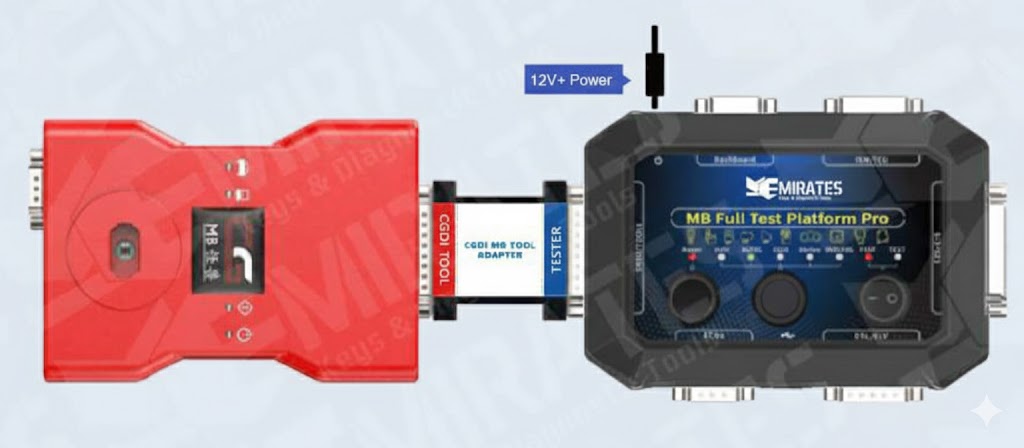
Working With CGDI MB and MB Full Test Platform Pro
FBS Systems (Mercedes-Benz)
FBS stands for Drive Authorization System (Fahrberechtigungssystem in German). It is Mercedes-Benz’s immobilizer and vehicle authorization architecture.
The FBS system determines:
- Whether a key is valid
- Whether the engine is allowed to start
- Whether modules trust each other
How This Applies to This Book
Whenever this book mentions:
- Password reading
- FAST calculation
- EIS renew
- ECU / TCU renew
- ELV personalization
You are working inside the FBS3 or FBS4 authorization framework.
Understanding this prevents mistakes and explains why some operations are allowed and others are restricted.
FBS3 System
What is FBS?
FBS3 is the third-generation Mercedes drive authorization system and is found on many vehicles from the early 2000s up to mid-2010s.
Core Components (FBS3)
- EIS / EZS – Electronic Ignition Switch (central authority)
- Key – Infrared or SmartKey
- ELV / ESL – Electronic Steering Lock
- ECU – Engine Control Unit
- TCU / VGS – Transmission Control Unit
- Gateway
How FBS3 Works (Simplified)
- Key is inserted or detected
- EIS authenticates the key
- EIS verifies ELV status
- EIS sends start authorization to ECU and TCU
- Engine start is allowed
All major modules store synchronized security data.
Why FBS3 Matters for Programming
- Passwords can be read or calculated
- Modules can often be renewed or virginized
- Keys can be added or replaced
- FAST calculation works on all FBS3 modules
This is why tools like the Full Test Platform Pro are powerful for:
- EIS repair
- ECU renew
- ELV replacement
- All-keys-lost situations
FBS4 System
What is FBS?
FBS4 is the fourth-generation Mercedes drive authorization system, introduced on newer vehicles (mid-2010s onward).
It significantly increases security.
Core Components (FBS4)
- EIS / EZS (Next Gen)
- Keyless GO SmartKey
- Gateway (more central role)
- ECU
- Dashboard
- Online Mercedes servers (for some operations)
Key Differences from FBS3
| Feature | FBS3 | FBS4 |
|---|---|---|
| Security Level | High | Very High |
| Password Access | Readable / Calculable | Highly restricted |
| Module Renew | Common | Limited |
| Online Authorization | No | Sometimes required |
| FAST Calculation | Yes | Yes (tool-dependent) |
Why FBS4 Is More Restricted
-
Security data is distributed and encrypted differently
-
Some operations require:
- Online authorization
- Tokens
- OEM-level tools
-
Not all modules can be renewed like FBS3
This is why FAST calculation and bench emulation are critical when working with FBS4 vehicles.
Why FAST Calculation Matters
FAST calculation is a method used by aftermarket tools to:
- Rapidly calculate security access data
- Reduce dependence on vehicle gateway
- Enable key and module operations on FBS3 and supported FBS4 vehicles
The Full Test Platform Pro provides:
- Gateway emulation
- ELV emulation
- Stable bench power
Which makes FAST calculation possible and reliable.
Practical Summary
- FBS3 = older Mercedes system, more flexible, widely programmable
- FBS4 = newer system, more secure, limited but supported by advanced tools
- Your tools exist to bridge the gap between these systems safely