Mercedes-Benz Full Test Platform Pro (MK24712)
The Mercedes-Benz Full Test Platform Pro is a professional on-bench testing, diagnostic, and programming platform designed specifically for Mercedes-Benz electronic control units.
Unlike basic key programmers, this tool allows you to power, simulate, test, and interact with multiple Mercedes modules outside the vehicle, making it essential for repair, diagnostics, renewals, and advanced programming work.
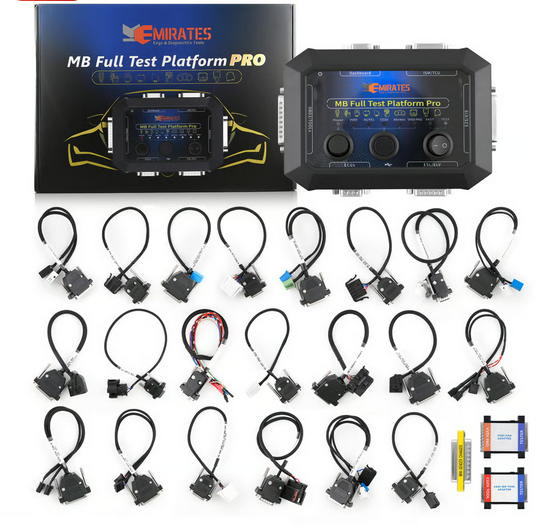
Figure 3.1: Mercedes-Benz Full Test Platform Pro – supports EZS/EIS, ELV/ESL, dashboards, ECUs, TCU, ISM
What This Tool Is Designed For
The Full Test Platform Pro is built to:
- Bench-test Mercedes control units without the car
- Simulate missing modules (ELV/ESL, Gateway)
- Work with multiple aftermarket programming tools
- Support FBS3 and FBS4 systems with FAST calculation
- Provide a safe environment for diagnostics and module repair
Front Panel – Physical Buttons
The Mercedes-Benz Full Test Platform Pro has three physical buttons on the front panel. These buttons control power, module routing, and operating mode.
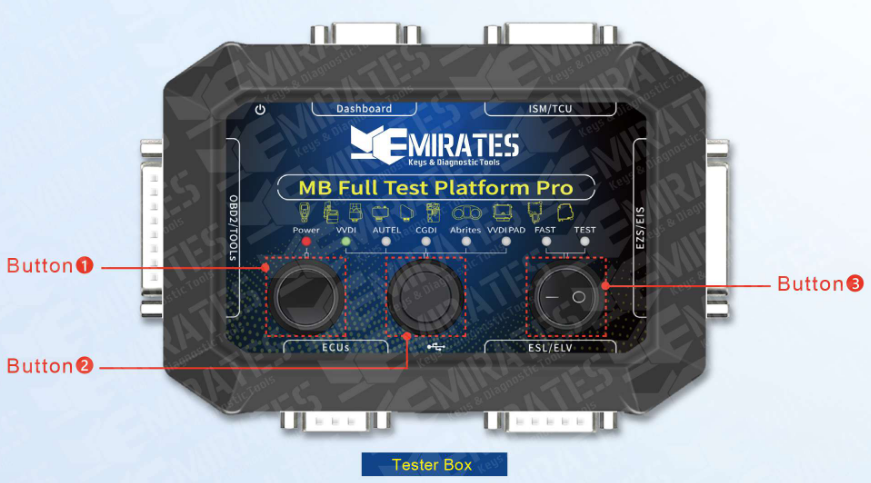
Figure 3.2: MK3 Front Panel with Buttons
॰ Button 1 (Power)
Function:
- Turns the test platform ON / OFF
Usage Notes:
- Must be OFF before connecting or disconnecting any module or cable
- Power ON only after all cables are connected correctly
- Power OFF before changing device mode or pin-out cables
⚠️ Never hot-plug modules while the platform is powered ON.
॰ Button 2 (Device Switch)
Function:
- Selects the active programming tool interface
- Routes communication and signal lines to match the selected programmer
Device Interfaces:
- VVDI
- AUTEL
- CGDI
- ABRITES
- VVDI PAD
Atention! Different device have different protocols, selecting the correct device is mandatory for successful communication.
Usage Notes:
- Always select the device interface that matches the connected programming tool
- Using the wrong device interface may result in:
- No communication
- Incorrect voltage routing
- Programming failure
॰ Button 3 (FAST / TEST)
Function:
- Switches between FAST mode and TEST mode
FAST Mode:
- Enables FAST calculation for FBS3 and FBS4 systems
- Used for:
- EIS / EZS password calculation
- Data collection
- Key programming support
- Security-related operations
TEST Mode:
- Used for bench testing and diagnostics
- Powers modules for:
- Communication testing (e.g, Simulating ELV/ESL behavior)
- Module verification
- Renew and repair operations
Side Panel – D-Subminiature (DB) Connector Details
The Test platform has 6 positions to insert DB cable and 2 positions for power and USB. Which is convenient for users to connect any control unit together and complete programming.
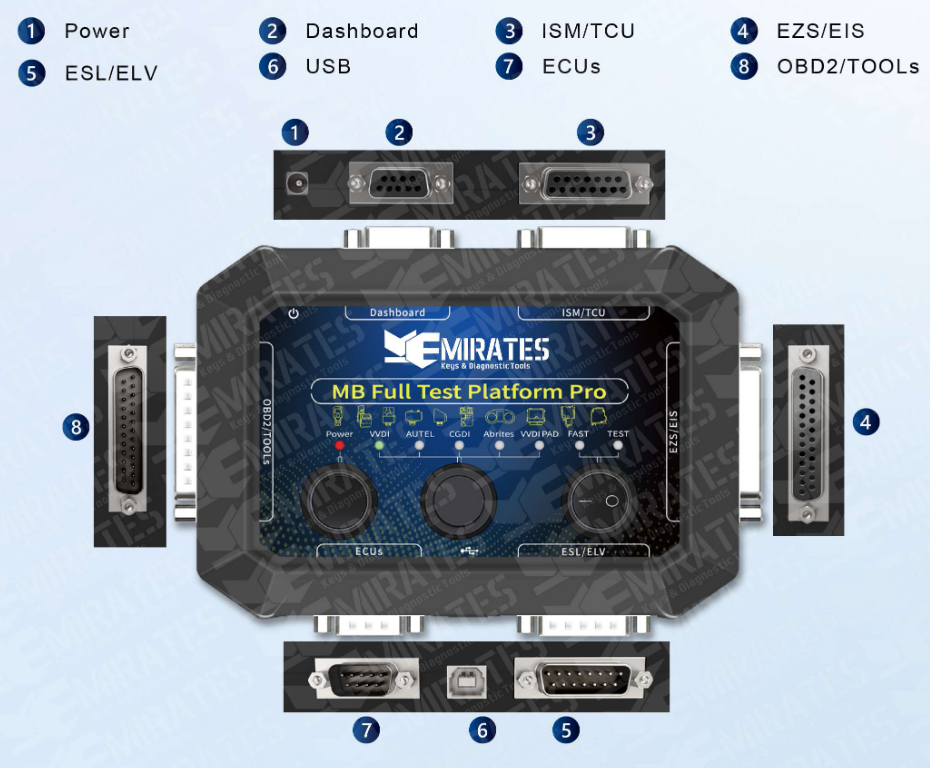
Figure 3.3: MK3 Side Panel with DB Connectors
Connector Functions
Based on the numbered legend in Figure 3.3, here is a breakdown of what each port does:
| No. | Label | Function & Purpose |
|---|---|---|
| 1 | Power | The DC input port. This provides the necessary 12V power to the platform and all connected Mercedes modules. |
| 2 | Dashboard | A DB9/DB15 style port used to connect the vehicle's Instrument Cluster. This allows you to check for mileage, warning lights, or communication errors on the bench. |
| 3 | ISM / TCU | Used for the Intelligent Servo Module (gear shifter) or Transmission Control Unit. Essential for virginizing or personalizing transmission components. |
| 4 | EZS / EIS | This connects to the Electronic Ignition Switch. This is the brain of the Mercedes security system where the key is inserted. |
| 5 | ESL / ELV | Connects to the Electronic Steering Lock. This is used to test if the steering lock is synchronizing properly with the key and ignition. |
| 6 | USB | A Type-B USB port used to connect the platform to a computer for firmware updates or to interface with diagnostic software. |
| 7 | ECUs | Used to connect the Engine Control Unit. This is vital for testing the drive authorization system (FBS3/FBS4) to ensure the engine will actually start. |
| 8 | OBD2 / TOOLS | This is the main interface for your diagnostic tools (like VVDI, Autel, Abrites, or CGDI). It acts as the bridge between your programmer and the modules connected to the other ports. |
Connector Cables and Adapters
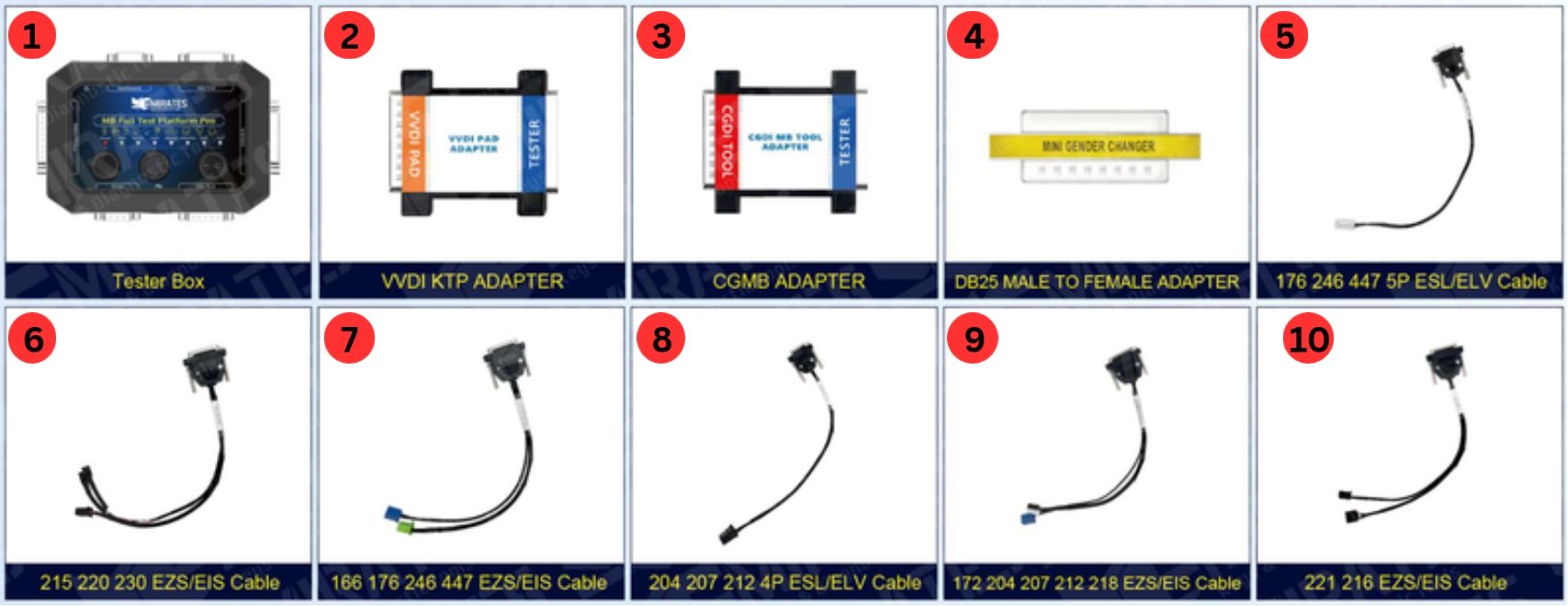
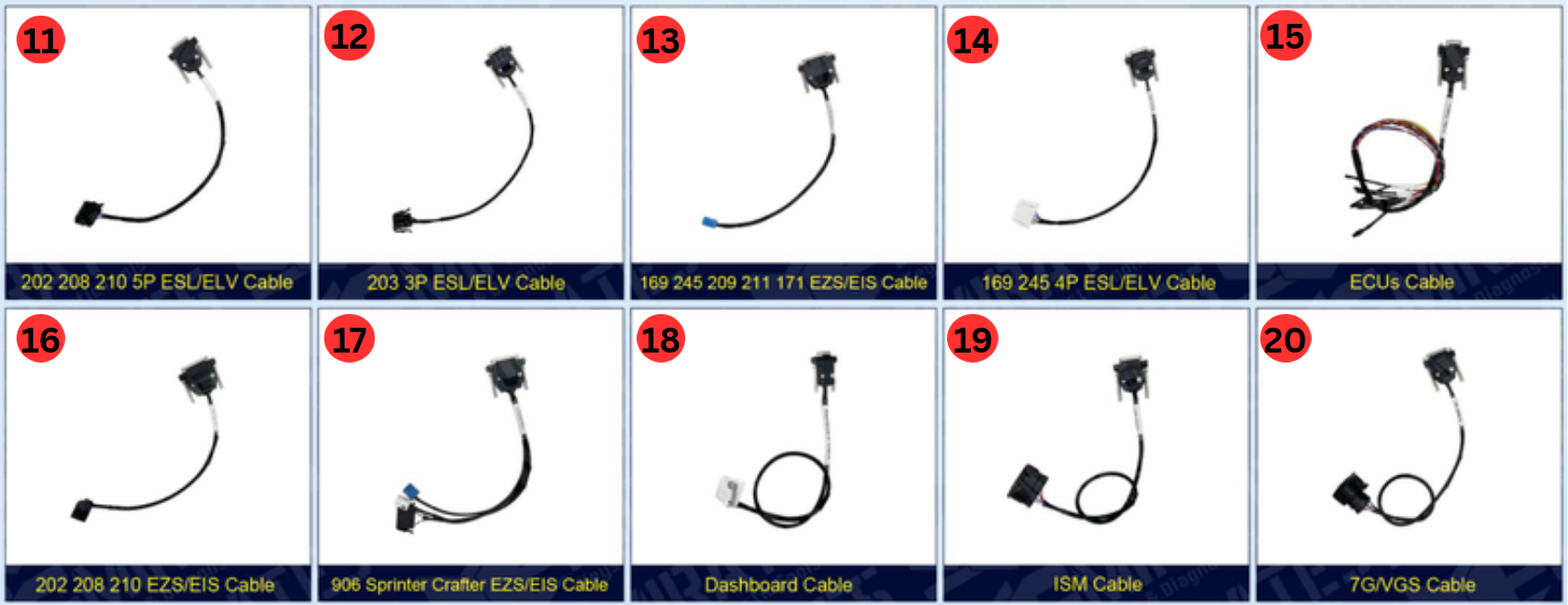

| 2. | VVDI KTP Adapter | 14. | 169 245 4P ESL/ELV Cable |
| 3. | CGMB Adapter | 15. | ECUs Cable |
| 4. | DB25 Male to Female Adapter | 16. | 202 208 210 EZS/EIS Cable |
| 5. | 176 246 447 5P ESL/ELV Cable | 17. | 906 Sprinter Crafter EZS/EIS Cable |
| 6. | 215 220 230 EZS/EIS Cable | 18. | Dashboard Cable |
| 7. | 166 176 246 447 EZS/EIS Cable | 19. | ISM Cable |
| 8. | 204 207 212 4P ESL/ELV Cable | 20. | 7G/VGS Cable |
| 9. | 172 204 207 212 218 EZS/EIS Cable | 21. | 205 222 EZS/EIS Cable |
| 10. | 221 216 EZS/EIS Cable | 22. | 203 463 639 Vito EZS/EIS Cable |
| 11. | 202 208 210 5P ESL/ELV Cable | 23. | 164 251 EZS/EIS Cable |
| 12. | 203 3P ESL/ELV Cable | 24. | 203 209 211 219 639 906 5P ESL/ELV Cable |
| 13. | 169 245 209 211 171 EZS/EIS Cable | 25. | OBD Cable |
Why This Tool Matters
The Mercedes-Benz Full Test Platform Pro is not just a tester — it is a controlled environment for safely working with Mercedes security and control modules. It reduces risk, speeds up diagnostics, and makes complex module operations possible without the vehicle present.